FX Experience Has Gone Read-Only
I've been maintaining FX Experience for a really long time now, and I love hearing from people who enjoy my weekly links roundup. One thing I've noticed recently is that maintaining two sites (FX Experience and JonathanGiles.net) takes more time than ideal, and splits the audience up. Therefore, FX Experience will become read-only for new blog posts, but weekly posts will continue to be published on JonathanGiles.net. If you follow @FXExperience on Twitter, I suggest you also follow @JonathanGiles. This is not the end - just a consolidation of my online presence to make my life a little easier!
tl;dr: Follow me on Twitter and check for the latest news on JonathanGiles.net.
by Richard Bair | Jun 22, 2009 | API Design, Web Services
While on vacation I’ve been watching twitter to see what kinds of things people are doing with JavaFX. One thing I’ve seen a fair amount of tweets on that is pretty gratifying is tying JavaFX to backend data services. One project is a port of Cairngorm from Flex to Java/JavaFX. Another was an earlier demo based on Hessian (which needs to be ported to JavaFX 1.2). Another was about integrating Flamingo to JavaFX.
(more…)
by Richard Bair | Jun 13, 2009 | API Design, Controls
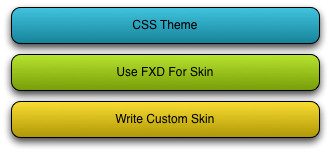
While Jasper is on vacation I thought I’d take a moment and outline the multi-level architectural approach we’ve taken with skinning Controls, and give some rough outline as to when the different levels will be fully supported in JavaFX.
There are basically three different levels of support for skinning in JavaFX.
Levels of Skinning
(more…)

by Jasper Potts | Jun 13, 2009 | Controls, UI Design
The new JavaFX controls were designed to be easily skinable so that you can create any look you can think up but we still need a default look that you get out of the box. The default skin that comes with JavaFX 1.2 is called Caspian which aims to be flexable and usable as is for a wide range of applications. I thought I would share a little about the design decisions I went through in designing Caspian.
The Requirements
- Needs to work in many types of applications from product sites though strong branded corporate sites to sparkly web 2.0 sites.
- Has to fit in and look in place on Windows, Mac, Mobile and TV
- Must not look identifiably like any other look
- Should complement the design of a application not over power it
The Technical Requirements
- Need to be CSS themable so the designer/developer can customize it to fit into their product design
- Vector based so that the controls look good even when scaled , rotating, animating etc.
- Needs to be technically simple so that it is fast to render
The Color
- Has to be gray to fit in with the current fashion and the widest range of products
- Needs an accent color for important UI parts such as focused items and default buttons on a dialog where the user attention needs to be drawn
- Has to work on wide range backgrounds
Initial Design
After experimenting with lots of designs and researching what other people are doing in the field here are the initial designs I did in Photoshop.
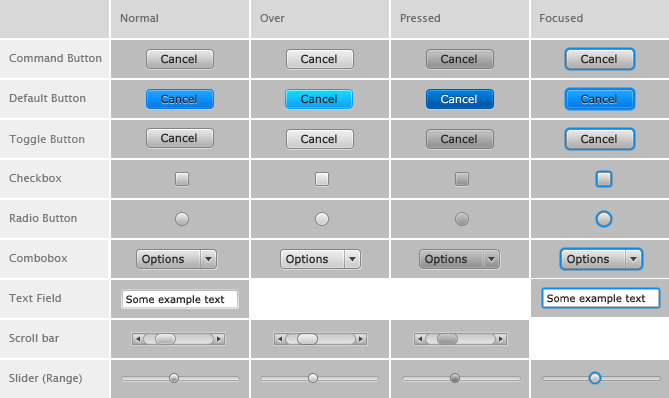
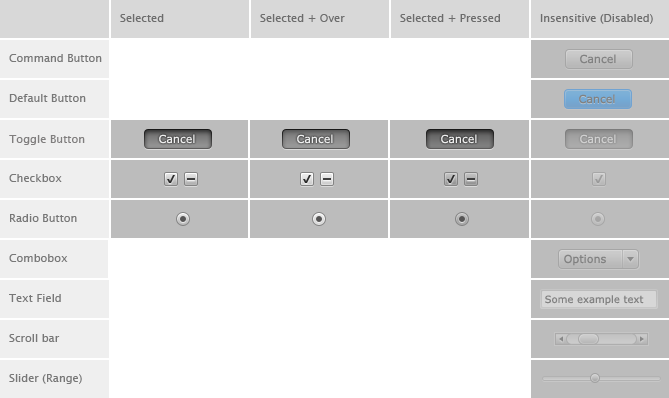
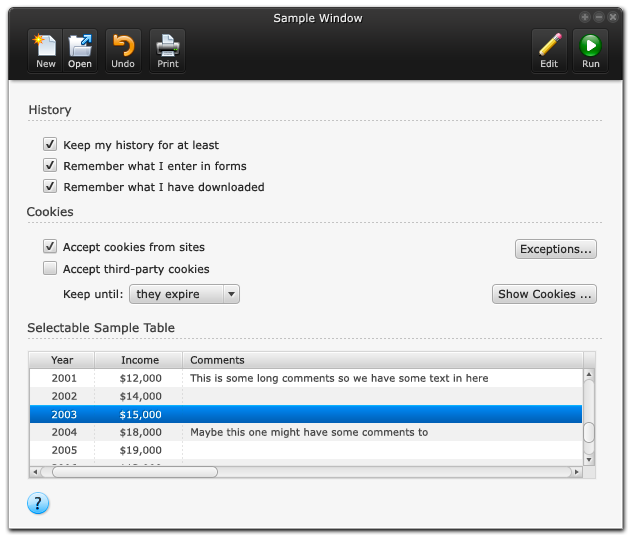
Example Window Design

Testing on a extreme range of colors
Hope you found that interesting the next few blogs on Caspian will cover how to style controls with CSS and how to make custom skins.
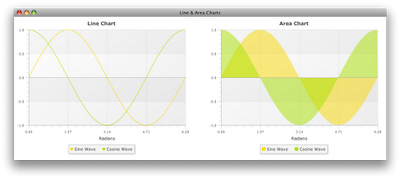
by Jasper Potts | Jun 12, 2009 | Charts
Another excellent article on JavaFX charts this time covering the various types of XYCharts.
The remaining five types of charts are all meant to work with XY data. These charts are all subtypes of the XYChart base class…

by Jasper Potts | Jun 10, 2009 | Charts, Links
Another good blog post was published today by Dean Iverson on JavaFX Charts.
The chart components included in JavaFX give developers an easy way to let the users of their applications visualize a wide variety of data. There are six kinds of charts supported in JavaFX 1.2:
Creating Charts in JavaFX


