FX Experience Has Gone Read-Only
I've been maintaining FX Experience for a really long time now, and I love hearing from people who enjoy my weekly links roundup. One thing I've noticed recently is that maintaining two sites (FX Experience and JonathanGiles.net) takes more time than ideal, and splits the audience up. Therefore, FX Experience will become read-only for new blog posts, but weekly posts will continue to be published on JonathanGiles.net. If you follow @FXExperience on Twitter, I suggest you also follow @JonathanGiles. This is not the end - just a consolidation of my online presence to make my life a little easier!
tl;dr: Follow me on Twitter and check for the latest news on JonathanGiles.net.
by Jonathan Giles | Oct 11, 2013 | ControlsFX
It’s been roughly a month since 8.0.2 Developer Preview 2 was released, but we’re back again already with the final release of ControlsFX 8.0.2 As I always eagerly note, despite the small version 0.0.1 version increment, this is a major release of ControlsFX, bringing with it a bunch of new functionality and bug fixes. Everyone is recommended to upgrade!
For those of you that have not been following along since 8.0.1 was released, there have been two developer releases of 8.0.2 – developer preview 1 and developer preview 2. You might want to browse back and see what was in those developer previews, but I’ve also included the highlights below (and if you’re really new to ControlsFX, you might want to check out the even higher-level ControlsFX feature overview page). If you just want to download ControlsFX, it’s at the usual location.
That’s enough – here is what’s new in 8.0.2 (compared with 8.0.1, which was released on July 7th, 2013):
(more…)
by Jonathan Giles | Oct 6, 2013 | Links
A bunch of links this week – enjoy 🙂
- Elliot Bentley has posted about WebFX, a project by Bruno Borges. WebFX is essentially a browser written in JavaFX that renders FXML pages (as well as the more traditional HTML page), which can be then scripted using a variety of JVM languages such as JavaScript.
- Geertjan Wielenga continues to explore JavaFX, and in particular the HTMLEditor control. This week he has three posts on this topic. Firstly, he has integrated the JavaFX HTMLEditor on top of HTML files on the NetBeans Platform to allow for an wysiwyg-style multiview editor (so that you can toggle between source editing and WYSIWYG editing). In another post you can see a video of this functionality. Finally, he reveals that this tooling is being developed to be used in his open source epub tool called Fosfor.
- Geertjan has also posted a summary of the talk at JavaOne about bck2brwsr, which is essentially a JVM written in JavaScript, that allows JavaFX applications to run in a web browser without the need for an applet.
- Simon Ritter has published the slides for the JavaOne session on using the Leap Motion device in JavaFX. This session was co-presented with Gerrit Grunwald, Johan Vos, and José Pereda.
- Speaking of Simon, he has also posted a summary of JavaOne.
- Danno Ferrin has posted about ‘dogfooding the future Java‘. Interestingly, he wrote and presented his sessions using JavaFX by rendering markdown syntax. To submit his slides to the conference organisers, he added printing support into his software so that he could print out each slide (and it only took 313 lines of code!).
- Thierry Wasylczenko has posted his CompilerFX code to github. CompilerFX is an application for compiling multiple Maven repositories. You can add existing repositories and then compile them sequentially but also compile them individually.
- Rob Terpilowski was interviewed by Jan Stafford over at TheServerSide.com about the pros and cons of moving from Swing to JavaFX.
- Felix Bembrick has written a blog post covering what he considers to be the six degrees of separation between JavaFX and iOS / Android devices (in other words, what he thinks is required for JavaFX to be accepted on these platforms).
- Jens Deters has posted that he has managed to solve the eGalax Touch Screen issues with JavaFX (on Raspberry Pi) that he has posted about previously.
- Sven Ruppert has posted an example about placing Buttons inside a TableView column.
- BrowserStudios.com has posted an introduction to JavaFX 2.x, where they cover why they choose to use it and how they use it.
That’s all folks! Catch you all next week.
by Jonathan Giles | Sep 29, 2013 | Links
Well, JavaOne is over and people are returning back to their home countries, hopefully energised and excited about where Java is heading. For that reason the amount of news this week is understandably light, but nonetheless, let’s get into the news.
JavaOne
- You can watch the JavaOne Strategy Keynote, JavaOne Technical Keynote and JavaOne Community Keynote videos online now.
- Jasper Potts has posted a video of the chess robot demonstrated at JavaOne last week. The interesting thing about this chess robot is that it is running with a Raspberry Pi and the software is coded in Java.
JavaFX
- Hendrik Ebbers has posted slides and details from his talks at JavaOne (along with Claudine Zillmann and Johan Vos). Firstly, Claudine and Hendrik have a post about getting emoji’s into JavaFX applications. Secondly, Hendrik has posted the slides from his “Let’s get wet” talk that he and Claudine presented regarding their AquaFX skin and CSS research. Thirdly, Claudine and Hendrik announced Flatter, which is a new CSS style for JavaFX designed for touch screens and embedded devices. Finally, Johan Vos and Hendrik presented on DataFX, which is “the best way to get real-world data into your JavaFX application”.
- Michael Hoffer has published a YouTube video summarising his JavaOne tutorial on ‘Creating Amazing Scientific Visualization Tools with JavaFX 8‘. It’s a good (and long) video, and well worth watching.
- Jim Laskey has blogged about how to implement setInterval and setTimeout JavaFX functions in JavaScript so that they may be used from Nashorn.
- yWorks have announced yFiles for JavaFX, which is a (commercial) library that allows you to create JavaFX diagramming applications that use the full range of possibilities provided by the JavaFX framework.
Catch you all next week! 🙂
by Jonathan Giles | Sep 22, 2013 | Links
JavaOne is underway! If you’re at the conference, have a great week, attend a bunch of sessions, but more importantly enjoy the hallway track. For those of you not at JavaOne, batten down the hatches if you’re on twitter and are trying to get work done this week! 🙂
- Jasper and Richard just presented in the JavaOne technical keynote, where they showed a custom-made tablet device called the DukePad. It is powered by a Raspberry Pi and featuring a touch screen, camera, HDMI output, GPIO pins, and more. It is powered with Java and has a custom-built JavaFX user interface.
- The Java Tutorials blog notes that JavaFX 8 Developer Preview Documents were published today on http://docs.oracle.com/javafx. They comprise Getting Started with JavaFX 3D Graphics, Adding HTML Content to JavaFX Applications, and Embedding Swing Content in JavaFX Applications.
- August Lammersdorf from InteractiveMesh has announced the first release of a COLLADA importer for JavaFX is now available. From the announcement, “the ModelBrowserJFX is correspondingly updated and enhanced with a tree and table based file system browser. It also provides an FXML export of the loaded scene graph.”
- Jeffrey Guenther has blogged about exploring the possibility of Graph Layouts in JavaFX.
- Robert Ladstätter has blogged about his continued work with JavaFX and OpenCV on his Color Extractor project. It’s also cool to see ControlsFX being used! 🙂
- Rob Terp has two blog posts this week. The first post is titled “Creating Custom JavaFX Components with Scene Builder and FXML“, and the second post is titled “Drag and Drop With Custom Components in JavaFX“.
- Tom Schindl has blogged about a memory leak in JavaFX 2.2, and has a link to the workaround used to avoid it.
- Chris Newland has posted about JITWatch, a Java HotSpot JIT Inspector written in JavaFX.
- Janice J. Heiss has published an interview with Johan Vos, regarding his plans for JavaOne, and his thoughts on topics such as social media, JavaFX and Java EE.
- Sven Ruppert has a blog post titled “CDI Callback<TableColumn, TableCell> cellFactory – from FXML“.
- Patrick Champion has written about JavaFX 8.0 and Lambda support.
Catch you all in a weeks time!
by Jonathan Giles | Sep 22, 2013 | General, JavaOne
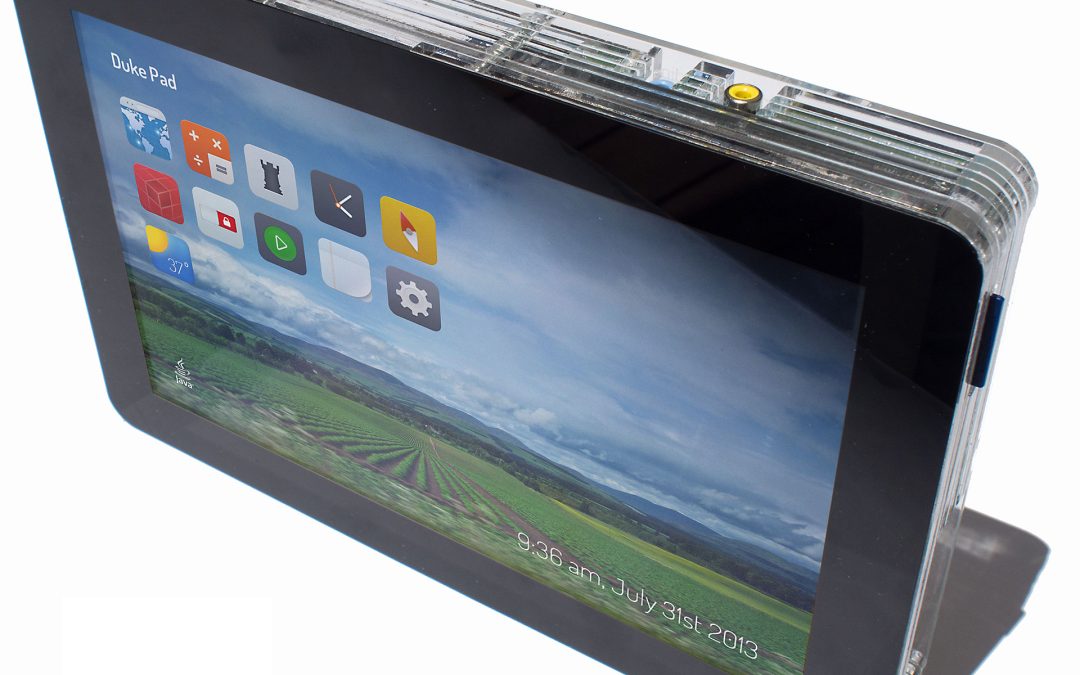
At the JavaOne technical keynote just now Richard and Jasper introduced the DukePad – a custom built tablet device powered by a Raspberry Pi and featuring a touch screen, camera, HDMI output, GPIO pins, and more. It is powered with Java and has a custom-built JavaFX user interface.
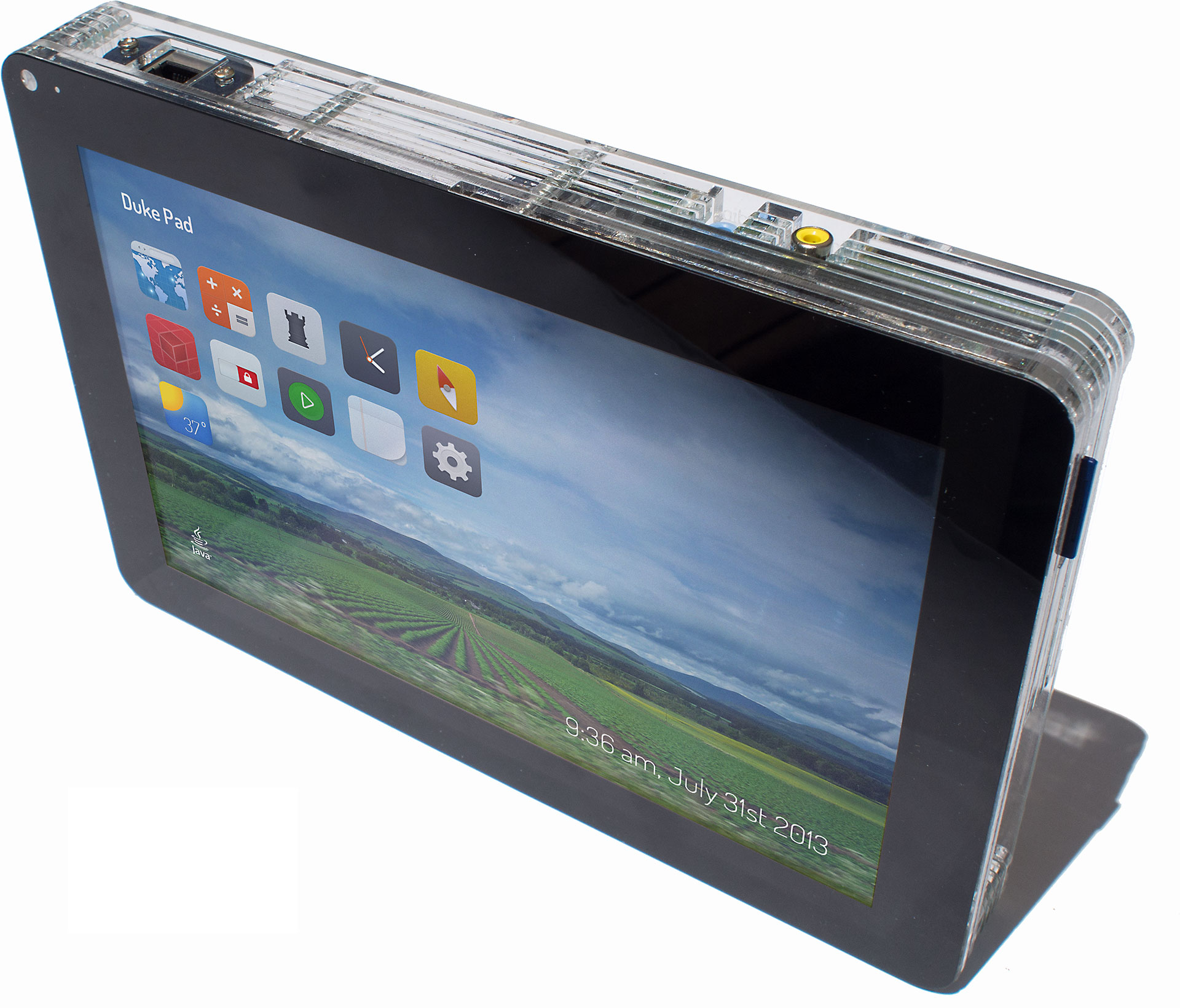
The DukePad is a Do-It-Yourself, make-at-home tablet computer based on the Raspberry PI and JavaSE Embedded 8. The plans and instructions for building the DukePad are available here, and we’re working with suppliers to make available pre-made kits that can be more easily assembled. The software on the DukePad uses Raspbian Linux as the operating system, and an OSGi-based JavaFX environment. Within this DukePad environment, apps are simple JavaFX OSGi Modules.
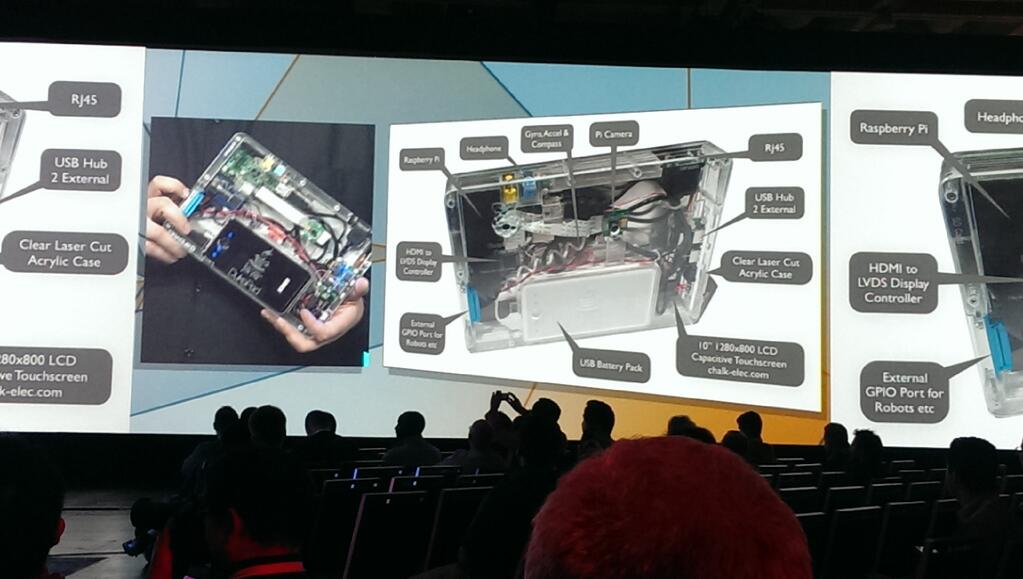
Click for bigger image
The DukePad is not a product, it is an open source, freely available set of plans and software for assembling your own tablet using off the shelf components. As such, the quality of the DukePad software environment is demo-quality (although we did strive to write as much real functionality as we could, the realities of demo presentations requires sacrificing time on parts of the applications that are not going to be shown, in favor of smoothing out those parts that will be shown). The code is hosted in the OpenJFX repositories under apps/experiments/DukePad. We hope to see forks of this code (GitHub, BitBucket, whatever you like best) and lots of experimentation and improvement that can be shared.


