
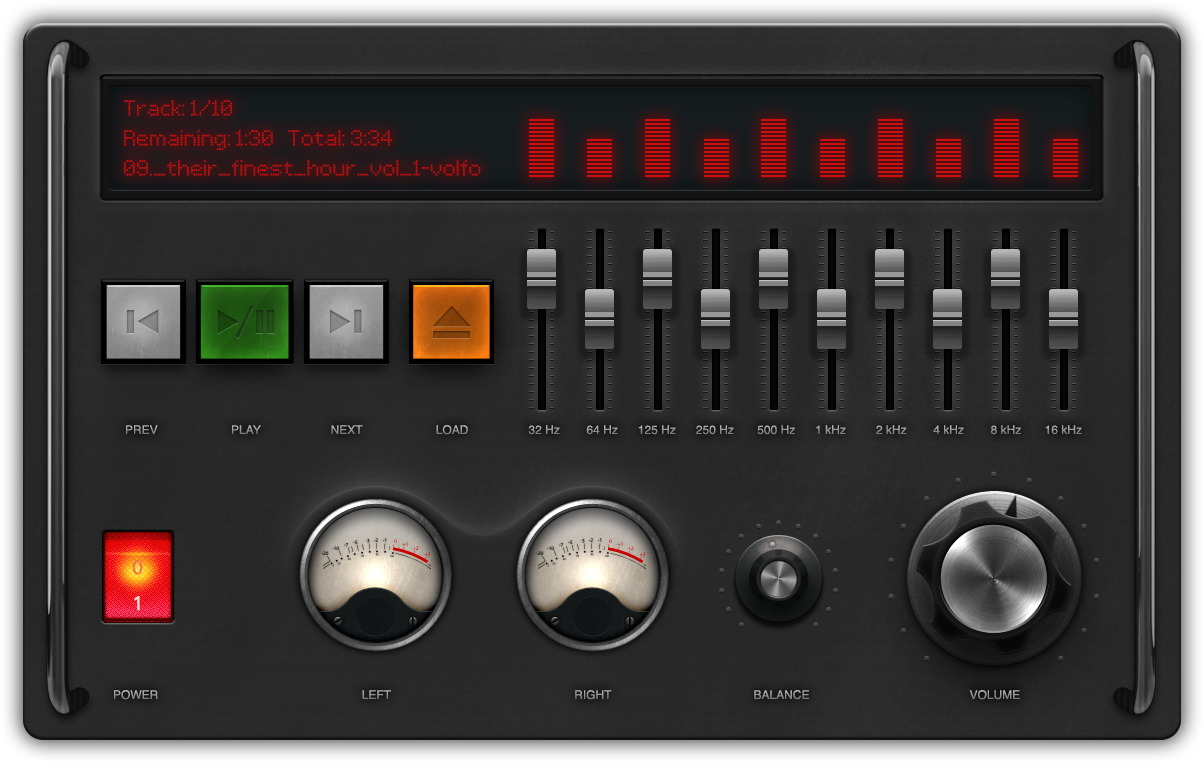
I was inspired by Dean Iverson’s tweet with a audio equalizer in JavaFX:
#JavaFX rocks. Literally. An example from our upcoming Pro JavaFX 2 book: pic.twitter.com/tSI4Vry4
and the equalizer view from that Pro JavaFX 2 example app: pic.twitter.com/T6jxvrf9
. updated pic.twitter.com/FqzgVimG
So wanted to have a go at doing one my self, so little while later I have a design and built a working application. Demo video after the break.
The Design
I started the design with a free Photoshop file from Diego Monzon:

You will see that some of it like the cool VU meters made it direct though to my design but then I played around with the other parts. I have added a link to the Photoshop file I created so you can see what I have done if you are intrested. From the photoshop file I produced a few PNG files which are used in the application, you can see them in the src images directory. I found a free LCD dot matrix font from dafont which is what I am using for the text on the screen. You can see in the code how this is loaded in JavaFX.
The Code
The application did not take that long to build, guess about a day in total and about 800 lines of code. I think it is fully working other than the balance is a little fiddly with the mouse. All the control customizations should have full keyboard navigation :-). It is mostly standard UI Controls just styled with Images and CSS. The round knobs like balance and volume I had to do something special for and created a knob skin for the Slider control. There was a bunch of the standard logic to load and parse M3U and XML playlists, a very simple data model object PlayList which just contains a url which it was loaded from and a observable list of Pairs, each Pair being a name for the song and a url to the song. We did not have all the low level media API I needed for the VU meters but as they are only really for show I made of some data from what we can get from AudioSpectrumListener.
Hope you enjoy playing with this fun little app as much as I did creating it. Hope it goes to show that you can create pretty much any UI that you can imagine in JavaFX 2.0 and even use standard controls so you maintain keyboard navigation, accessibility etc.


cool!
Jasper,
Nice video!
I downloaded the code and ran it. Yeah, way too cool!
The code is so easy to understand. Wow!
Just a heads up:
I did notice in the console about CSS gradient warning (I think it mentioned something was depreciated?) and to refer to the CSS reference. Things seem to run fine. I’m running things using JavaFX 2.0.2. I’m just wondering do I need to upgrade to 2.1?
Great job.
Thank you!
This would really nice on a tablet.
😉
Carl
will you please forward the project file because it was not available now thank you.
Wow it’s amazing .
I ‘m fond of making GUI in javafx so I really love your GUI Design and the custom font loading . Keep it up dudes !! 🙂
Thanks
Narayan
Very, very nice Jasper =)
The code of the LoadDialog class literally screams “BUILDER PATTERN!!!” 😉
seems cool!
I know that JavaFX applets run only on windows and you don’t want to leave the impression that they do not work in general, but using flash player to showcase javafx is not a better solution…
Everyone that is interested in javafx knows that the Mac and Linux versions are in the works, so adding a note and embedding the javafx applet would be a better solution in my opinion.
You can use the javafx deployment scripts to detect if it is a windows machine and then embed the applet..if not -> show the youtube video.
Best and keep up the good work!
Great idea, doing the applet/video auto switch. I will try and put up a applet version when I have a minute.
That will be a good idea, most people needs live demos in applet or web start application.For those people who don’t use yet JavaFX or don’t use netbeans, if we have to tell them about JavaFX they asked us about lives demos.
Jasper
You are the main man for this, I can see. I can’t download this code anymore (maybe too old?)
Can you help me with this type of script?
Great work, good example touches in a sort of short example many aspects of JavaFX.
Keep on rocking.
Cheers, Rob.
It so difficult for me to use mouse in the balance input
Hello Jasper and thank you for your work.
I have only one question, you use in your project : com.sun.javafx.scene.control.skin.SkinBase
It seems to be an private API so how can we do the same with the public API, in particular for the KnobVolume controller ?
Thanks for your answer..
Gaëtan.
Hi
As JavaFX 2.0 now works on GNU Linux, you should update this page to allow us to run your demo instead of displaying the Youtube video. Best regards.
Sorry, I meant “JavaFX 2.1 developer preview” now works on GNU Linux.
I have tried out a Applet with my new blog post http://fxexperience.com/2012/01/curve-fitting-and-styling-areachart/ hopefully that will work for everyone on Windows for now, other platforms just getting static picture. Then Mac and Linux as soon as we have the plugin available.
very nice audio player and amazing work
so i’m a beginner developer in java and i love it the javaFX and i need to help just for a first step in javaFX
thanks for all
and good luck for every one
Very cool! I found this because someone asked a question about how to modify the knob to “snap to ticks”, and I worked out the answer: http://stackoverflow.com/questions/11288797/
I did have one little problem with the code. I needed to add “toExternalForm()” method to get the font to load correctly:
String fontPath = FxExperiencePlayer.class.getResource(“lcddot.ttf”).toExternalForm();
Font lcd = Font.loadFont(FxExperiencePlayer.class.getResourceAsStream(fontPath),14);
I like your program that is amazing.
and i am new to javafx so your sample audio player is real nice thanks.
When I tried to open the project in netbeans 8, it gives error as Default_JFX_Platform couldnot be found
Unfortunately Netbeans projects are not future comparable so you may need to create a new project just pointing at the src directory.
Hi,
When I tried to open the project in netbeans IDE 8.0. I have many problems of cannot find symbol, package name, etc…
Can you try to make a zip with a compilation in netbeans IDE 8.0.
Thanks in adavance.
Download is not available anymore? do you have a copy of it?
Regards
Hello your application seems nice
I want to download source code but the download link was not working I think it was removed so please will you give me any other download.
Thank you.
I know that it’s an old post but i’d like to download the source code and the link doesn’t work. Can do something? Thanks in advance.
These links also don’t work. I’d really appreciate it if you update the links. It would really helpful to me. Thanks 🙂
Hi Jasper,
The links for source code for Fun JavaFX 2.0 Audio Player on this page are no longer valid. I am just starting with JavaFX. Have been looking very hard for a rotator control slider as you have implemented. Surprised this does not exist in ControlsFX. Any chance you can point me to source code for your 2012 Audio Player?
Thanks,
Fixed link, moved to github
Hi, is hard to me migrate to java 1.8, somebody help-me.